
Overview
Conditional Flow lets you pick a different agent (Flow ID) for the same action based on what you know about a lead — without creating separate processes.“Use Agent A by default, but if the lead matches these rules, use Agent B instead.”The agent is chosen at the moment the action runs, using the lead’s most recent data.
Where to Find It
Process editor → any action that has a Flow ID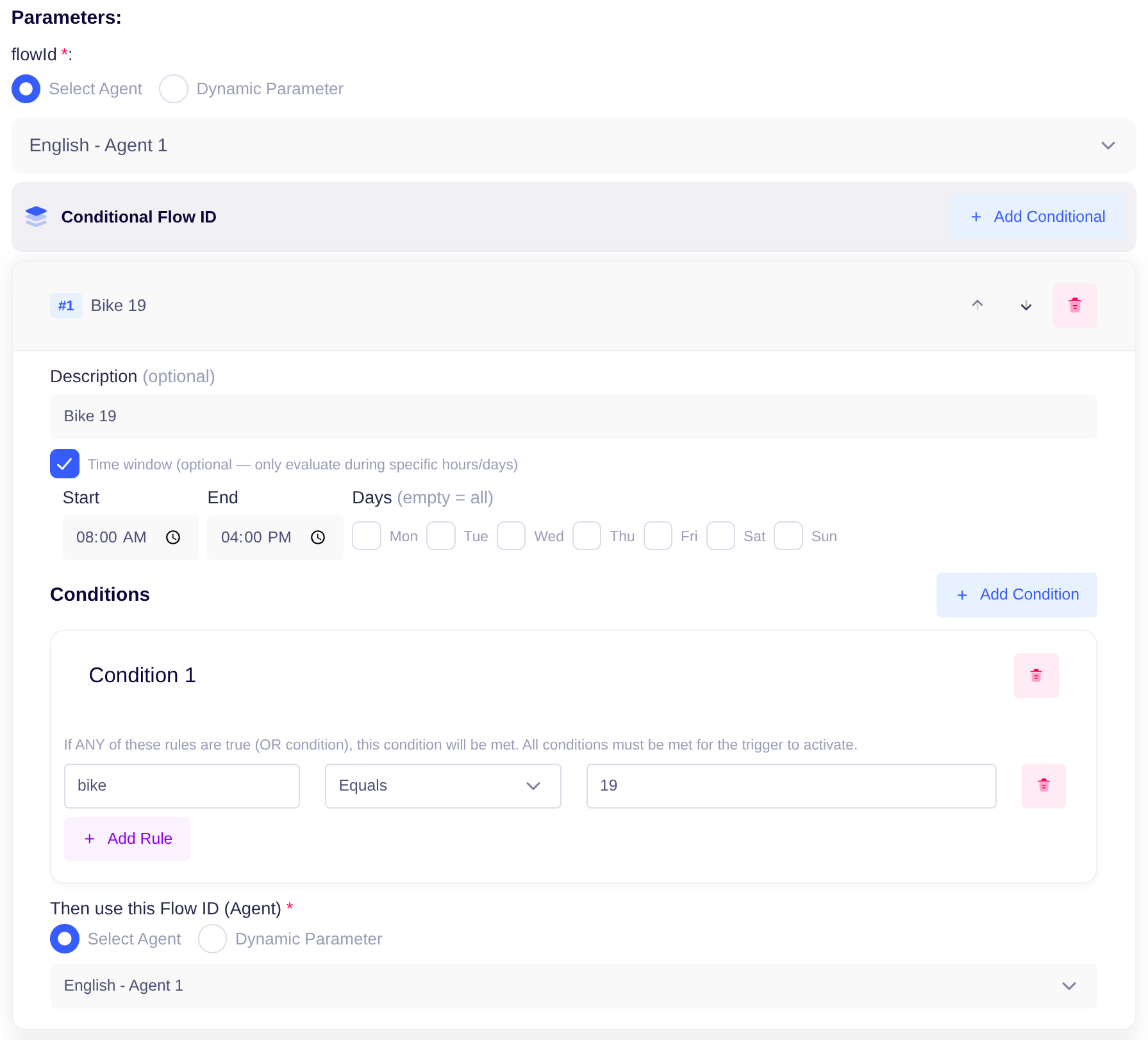 (Make Call, Send WhatsApp, Send CD WhatsApp, Send Rampwin WhatsApp, Send Rampwin Webhook)
Below the existing Flow ID dropdown you will see a new section: Conditional Flow ID with a + Add Conditional button.
(Make Call, Send WhatsApp, Send CD WhatsApp, Send Rampwin WhatsApp, Send Rampwin Webhook)
Below the existing Flow ID dropdown you will see a new section: Conditional Flow ID with a + Add Conditional button.
Setting Up a Rule
Each conditional card has four parts:
Use the up/down arrows to reorder rules and the trash icon to delete them.
Time Window
Each rule can optionally be restricted to a time window. When a time window is set, the rule is skipped entirely if the current wall-clock time is outside the window — even if the conditions would otherwise match. Enable it with the Time window checkbox on any conditional card.
Times are interpreted in the Asia/Kolkata timezone.
Note: Time window and conditions are evaluated together. A rule only fires when the current time is inside the window and the conditions match.
How the Agent Is Picked
- Rules are evaluated top to bottom.
- The first rule whose conditions match is used.
- If no rule matches, the default Flow ID at the top is used.
- To add a guaranteed fallback that is not the default, add a final rule with no conditions.
Things to Remember
- Order matters — first match wins.
- Default still applies when no rule matches.
- The decision is made at run time, even for delayed or scheduled actions.
- Existing processes are unaffected until you add a conditional rule.
- A rule with an empty Flow ID is ignored (the UI shows a red warning).
- A rule with a time window is skipped if the action runs outside that window — the next rule is tried instead.
Example
A lead with
language = hi → Agent-B (rule 1 matches first).A lead with
language = en and country = India → Agent-C (rule 2 matches).All other leads → Agent-A (default).
Test Cases
Use these to confirm the feature works as expected. For each case, set up the rule, push a test lead through the action, then check which Flow ID was used in the lead’s call attempt or WhatsApp activity.Frequently Asked Questions
What variables can I use in conditions?
What variables can I use in conditions?
Anything on the lead —
language, lastDisposition, pastDispositions, metadata fields, learned-data fields, etc.What happens if a rule has an empty Flow ID?
What happens if a rule has an empty Flow ID?
The rule is ignored. The UI shows a red warning to flag it.
How do I undo conditional routing?
How do I undo conditional routing?
Delete all conditional rules. The action reverts to the default Flow ID.
What if the action runs outside the time window?
What if the action runs outside the time window?
That rule is skipped and the next rule is evaluated. If no remaining rules match, the default Flow ID is used.
Can I combine a time window with conditions?
Can I combine a time window with conditions?
Yes. Both must be satisfied — the current time must be inside the window and the conditions must match.
Can I route by time alone, without any conditions?
Can I route by time alone, without any conditions?
Yes. Leave conditions empty and set only a time window. The rule will then match every lead during that window.Example — use Agent A during the day and Agent B in the evening: