> ## Documentation Index
> Fetch the complete documentation index at: https://docs.uservox.ai/llms.txt
> Use this file to discover all available pages before exploring further.
# How to add Webhook to a process
> Webhooks allow you to receive real-time updates about lead activity and process outcomes in your own system. By adding a webhook (called Lead Update Callback), you can push lead status, call activity, and disposition updates to your backend automatically.
This guide explains how to add and configure a webhook for a process.
## Step-by-Step: Add a Webhook to a Process
### 1. Open the Process
* Go to **Processes** from the main dashboard.
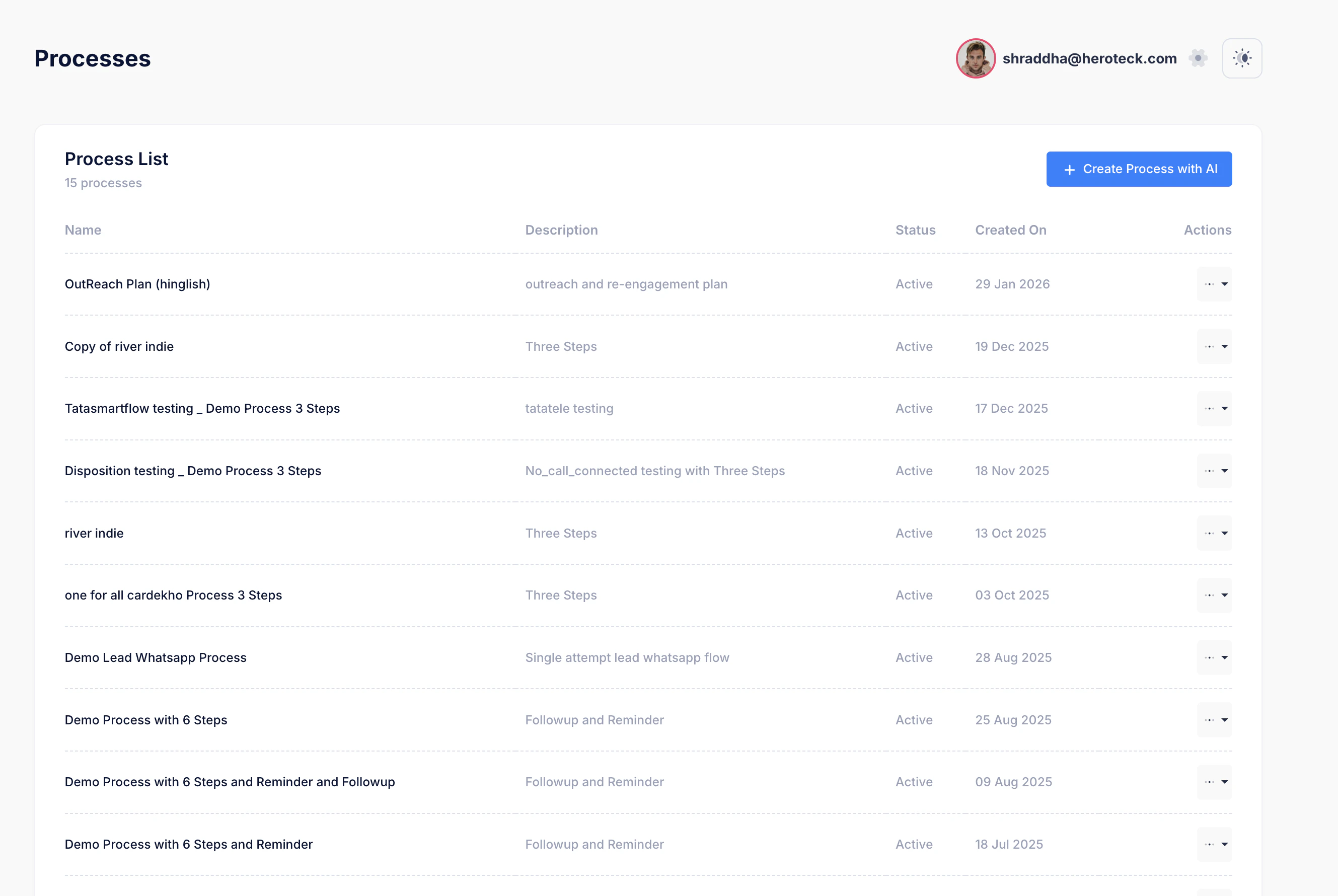 * Select the process where you want to add the webhook (e.g., *OutReach Plan (hinglish)*).
### 2. Go to Advanced Settings
* Inside the process details page, scroll down to **Advanced Settings**.
* Select the process where you want to add the webhook (e.g., *OutReach Plan (hinglish)*).
### 2. Go to Advanced Settings
* Inside the process details page, scroll down to **Advanced Settings**.
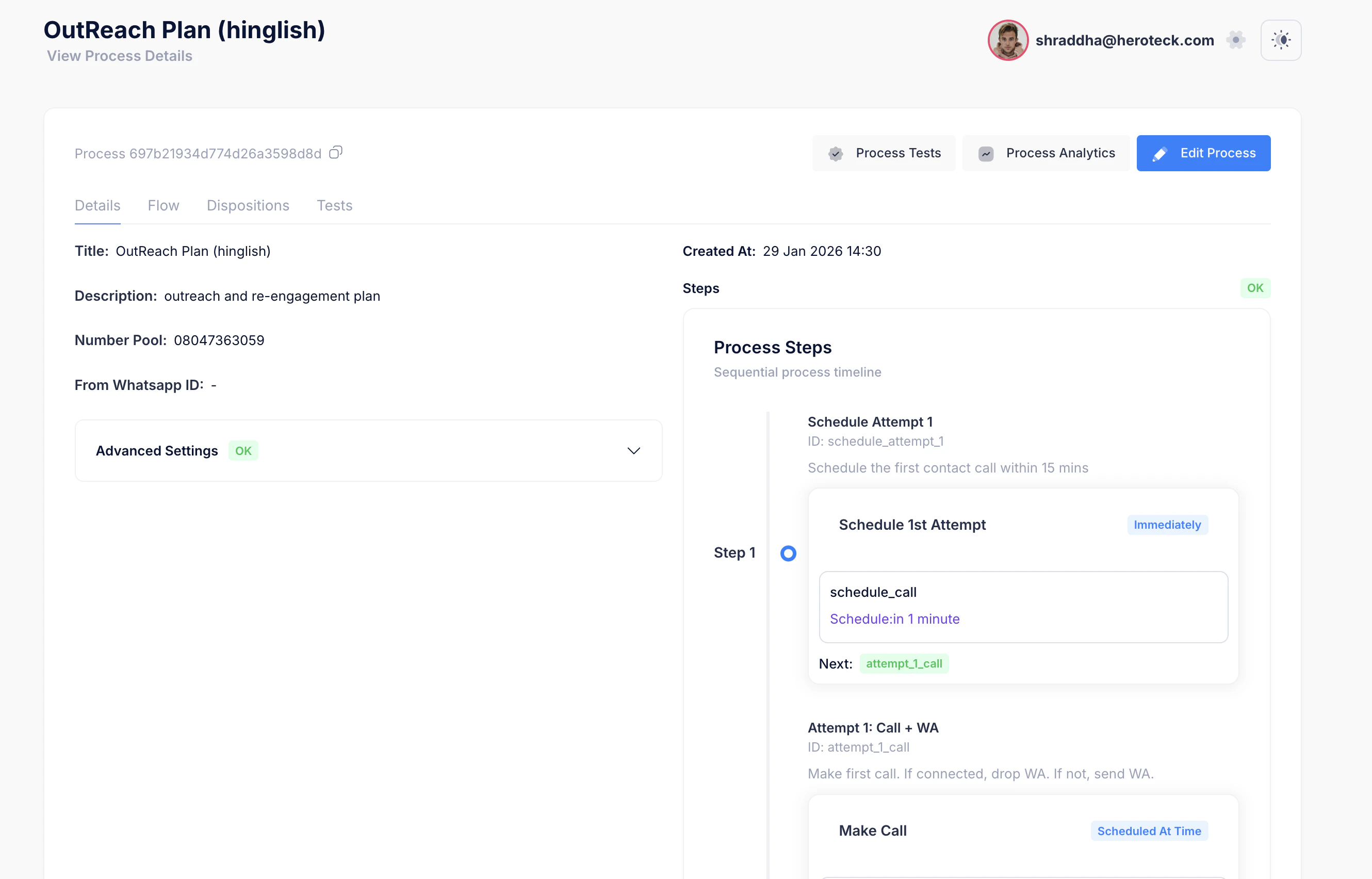 * Expand the section if it is collapsed.
* You will see **Lead Update Callbacks**.
### 3. Add a New Callback
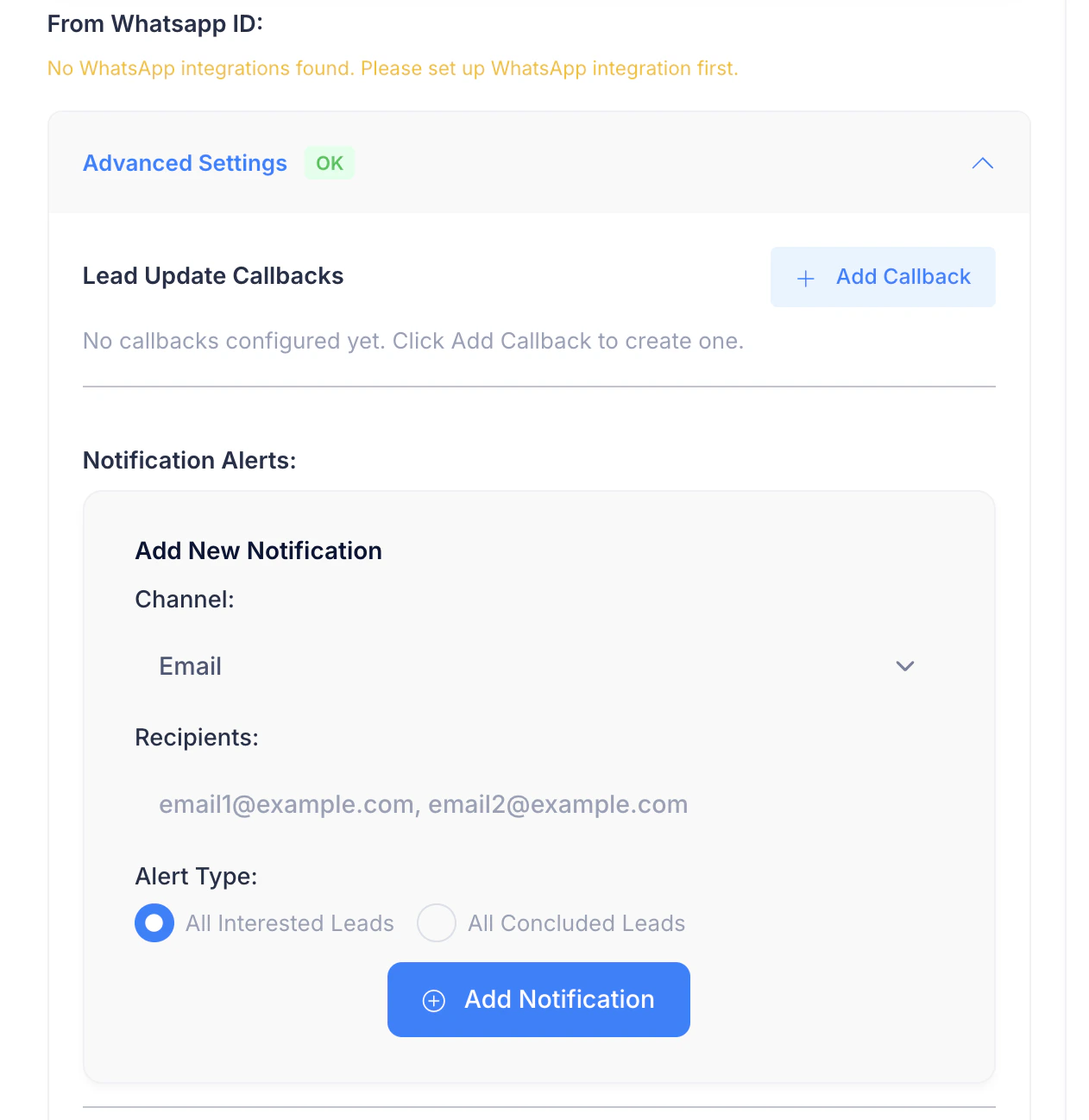
* Click on **+ Add Callback**.
* A new block (e.g., *Callback 1*) will appear.
* Expand the section if it is collapsed.
* You will see **Lead Update Callbacks**.
### 3. Add a New Callback
* Click on **+ Add Callback**.
* A new block (e.g., *Callback 1*) will appear.
 ### 4. Configure the Webhook
#### a. Lead Update URL
* Enter your webhook endpoint URL.
Example:
```
https://yourdomain.com/api/lead-callback
```
This endpoint will receive POST requests when lead updates occur.
### 4. Configure the Webhook
#### a. Lead Update URL
* Enter your webhook endpoint URL.
Example:
```
https://yourdomain.com/api/lead-callback
```
This endpoint will receive POST requests when lead updates occur.
 #### b. Payload Format
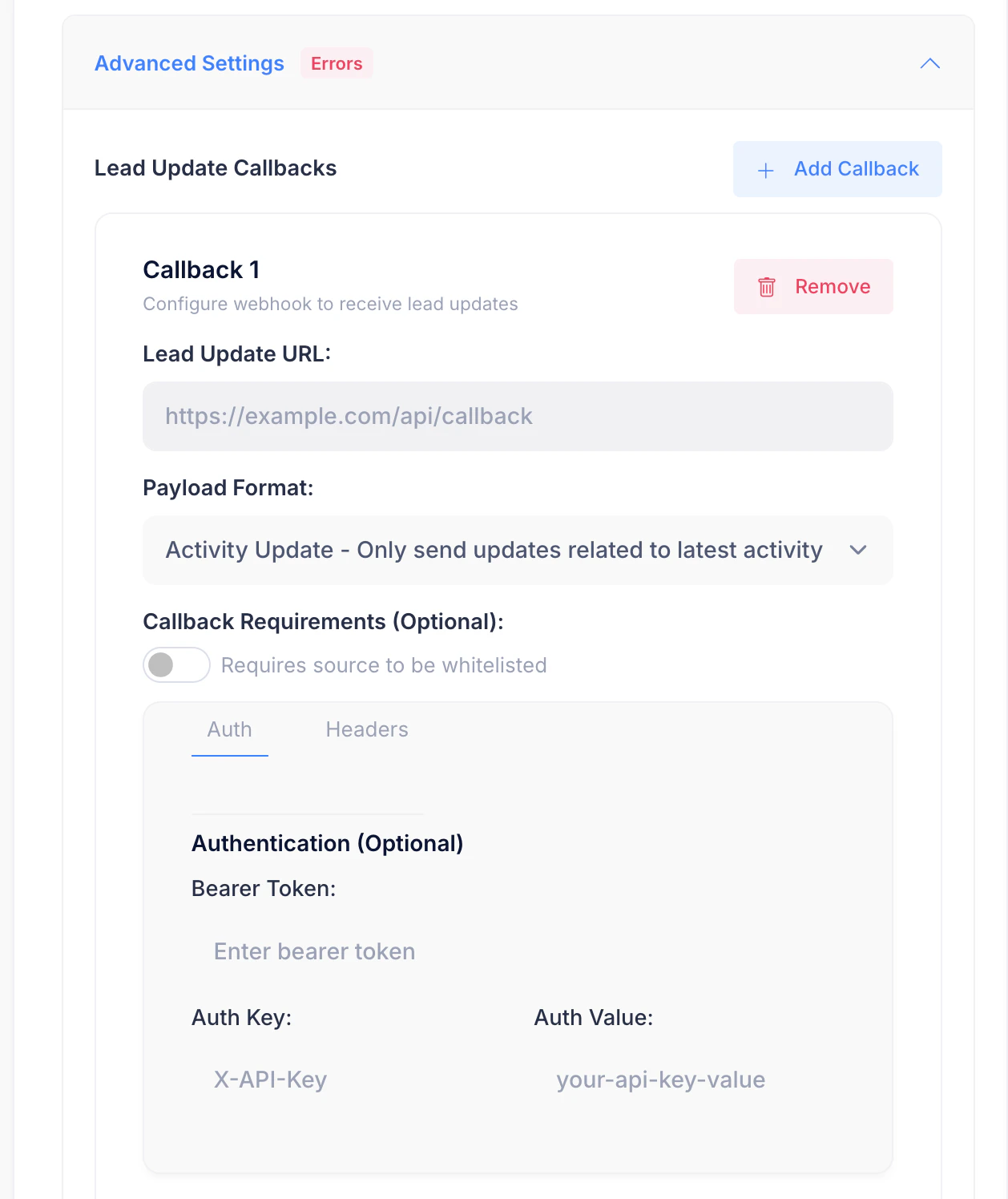
Choose how much data you want to receive:
* **Activity Update – Only send updates related to latest activity** (recommended)
This sends updates only when something meaningful happens (call completed, disposition updated, etc.).
#### c. Callback Requirements (Optional)
* Enable **Requires source to be whitelisted** if your server only accepts requests from approved IPs.
#### d. Authentication (Optional)
If your endpoint requires authentication, configure one of the following:
* **Bearer Token**
* Add a token that will be sent in the `Authorization` header.
OR
* **Custom Auth Header**
* **Auth Key**: e.g. `X-API-Key`
* **Auth Value**: your API key value
These headers will be included with every webhook request.
### 5. Save and Verify
* Make sure there are no validation errors (Advanced Settings should show **OK**, not **Errors**).
* Save the process if required.
Once saved, the webhook becomes active immediately.
## When Will the Webhook Fire?
The webhook is triggered when:
* A call attempt is completed
* Lead status changes (Interested, Not Interested, No Answer, etc.)
* Final disposition is marked
* The latest activity in the process changes
## Common Errors & Tips
* **Advanced Settings shows “Errors”**
* Check that the Lead Update URL is valid (HTTPS recommended)
* Ensure required auth fields are correctly filled
* **No callbacks received**
* Confirm your endpoint accepts `POST` requests
* Verify authentication headers
* Check server logs for rejected requests
## Best Practices
* Use a dedicated endpoint for webhooks
* Log incoming payloads for debugging
* Respond with HTTP `200 OK` quickly to avoid retries
* Secure the endpoint using auth headers
***
You’re now set up to receive real-time lead updates from your process 🚀
#### b. Payload Format
Choose how much data you want to receive:
* **Activity Update – Only send updates related to latest activity** (recommended)
This sends updates only when something meaningful happens (call completed, disposition updated, etc.).
#### c. Callback Requirements (Optional)
* Enable **Requires source to be whitelisted** if your server only accepts requests from approved IPs.
#### d. Authentication (Optional)
If your endpoint requires authentication, configure one of the following:
* **Bearer Token**
* Add a token that will be sent in the `Authorization` header.
OR
* **Custom Auth Header**
* **Auth Key**: e.g. `X-API-Key`
* **Auth Value**: your API key value
These headers will be included with every webhook request.
### 5. Save and Verify
* Make sure there are no validation errors (Advanced Settings should show **OK**, not **Errors**).
* Save the process if required.
Once saved, the webhook becomes active immediately.
## When Will the Webhook Fire?
The webhook is triggered when:
* A call attempt is completed
* Lead status changes (Interested, Not Interested, No Answer, etc.)
* Final disposition is marked
* The latest activity in the process changes
## Common Errors & Tips
* **Advanced Settings shows “Errors”**
* Check that the Lead Update URL is valid (HTTPS recommended)
* Ensure required auth fields are correctly filled
* **No callbacks received**
* Confirm your endpoint accepts `POST` requests
* Verify authentication headers
* Check server logs for rejected requests
## Best Practices
* Use a dedicated endpoint for webhooks
* Log incoming payloads for debugging
* Respond with HTTP `200 OK` quickly to avoid retries
* Secure the endpoint using auth headers
***
You’re now set up to receive real-time lead updates from your process 🚀