> ## Documentation Index
> Fetch the complete documentation index at: https://docs.uservox.ai/llms.txt
> Use this file to discover all available pages before exploring further.
# Human Call Quality Analysis (HumanCQ)
> Human Call Quality Analysis (HumanCQ) uses AI to automate the evaluation of customer calls, reducing the need for manual QA effort. It analyzes each call against predefined KPIs—like data capture, compliance, and sentiment—and automatically classifies them as Attributed or Non-Attributed. This helps teams save time, maintain consistency, and focus only on calls that need human attention.
The **HumanCQ** system enables automated and human-assisted evaluation of call quality based on defined **Key Performance Indicators (KPIs)**.\
Each call is analyzed, scored, and categorized—e.g., **Attributed** or **Non-Attributed**—based on compliance, completeness, and contextual understanding.
### 1. Configuration Setup
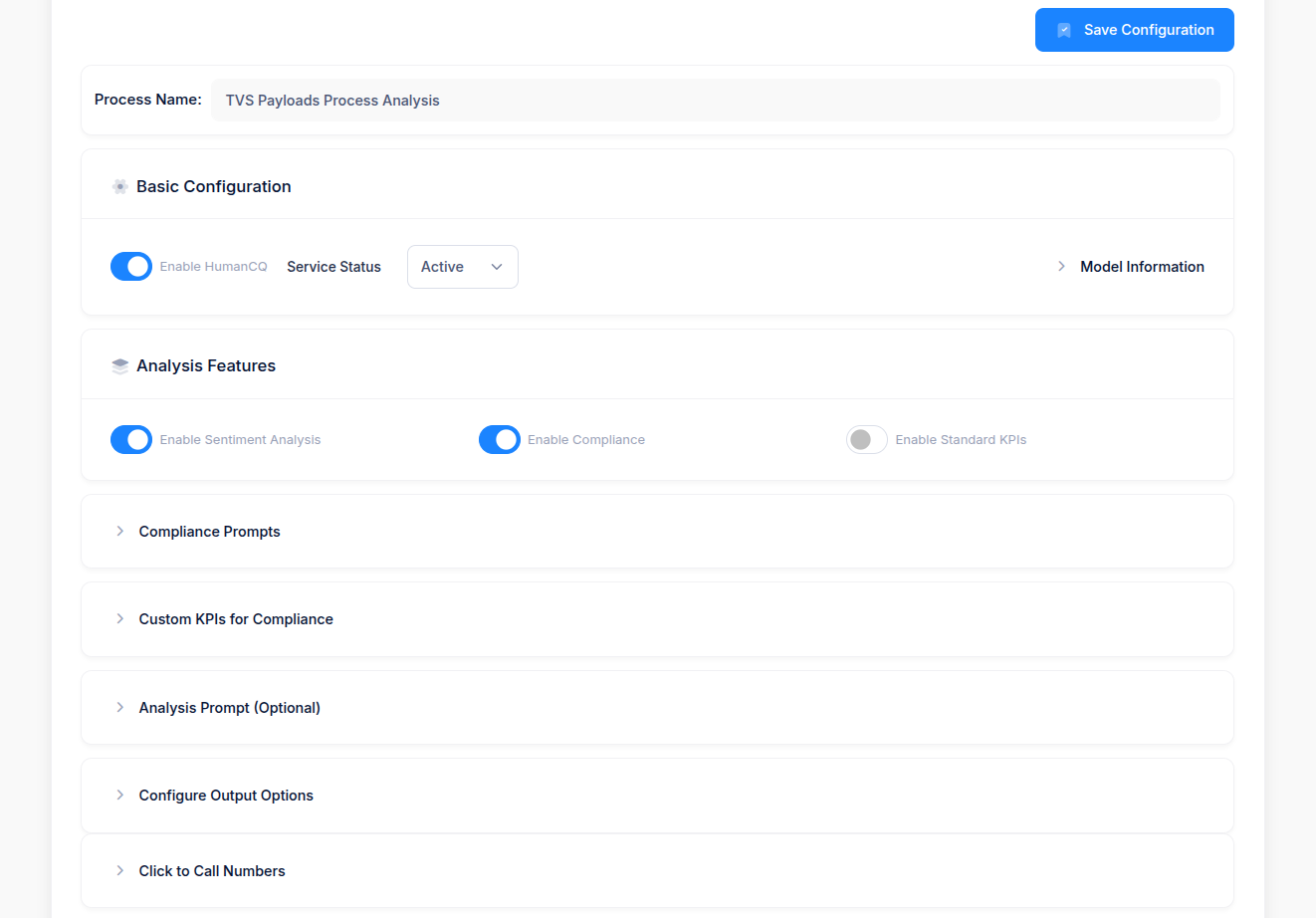
Under the configuration panel, users can:
* **Enable HumanCQ** for active analysis.
* Set **Service Status** as *Active/Inactive*.
* Choose the desired **Analysis Features**, such as:
✅ **Sentiment Analysis**
✅ **Compliance Checking**
⚪ **Standard KPIs (optional)**
All these settings can be managed from the **Configuration Dashboard**, ensuring flexibility in process-level analysis.
 ### 2. KPI Setup and Compliance Configuration
Users can define **Custom KPIs** under:
* **Compliance Prompts:** To check for mandatory phrases, disclaimers, or actions.
* **Custom KPIs for Compliance:** To track business-specific quality measures (e.g., greeting, verification, offer explanation, closure).
* **Analysis Prompt (Optional):** For open-ended AI-driven evaluation.
These KPIs form the evaluation framework against which every call is analyzed.
### 3. Call Analysis and Output
Once calls are processed:
* Each call is **auto-analyzed** by HumanCQ.
* The output includes:
* **Call Status:** Completed / Failed
* **Sentiment Analysis:** Positive / Negative / Neutral (if enabled)
* **Attribution Status:** Attributed / Non-Attributed
* **Additional Metrics:** Captured or Missing key fields (e.g., Brand, Model, Booking Name, Dealer City, etc.)
### 2. KPI Setup and Compliance Configuration
Users can define **Custom KPIs** under:
* **Compliance Prompts:** To check for mandatory phrases, disclaimers, or actions.
* **Custom KPIs for Compliance:** To track business-specific quality measures (e.g., greeting, verification, offer explanation, closure).
* **Analysis Prompt (Optional):** For open-ended AI-driven evaluation.
These KPIs form the evaluation framework against which every call is analyzed.
### 3. Call Analysis and Output
Once calls are processed:
* Each call is **auto-analyzed** by HumanCQ.
* The output includes:
* **Call Status:** Completed / Failed
* **Sentiment Analysis:** Positive / Negative / Neutral (if enabled)
* **Attribution Status:** Attributed / Non-Attributed
* **Additional Metrics:** Captured or Missing key fields (e.g., Brand, Model, Booking Name, Dealer City, etc.)
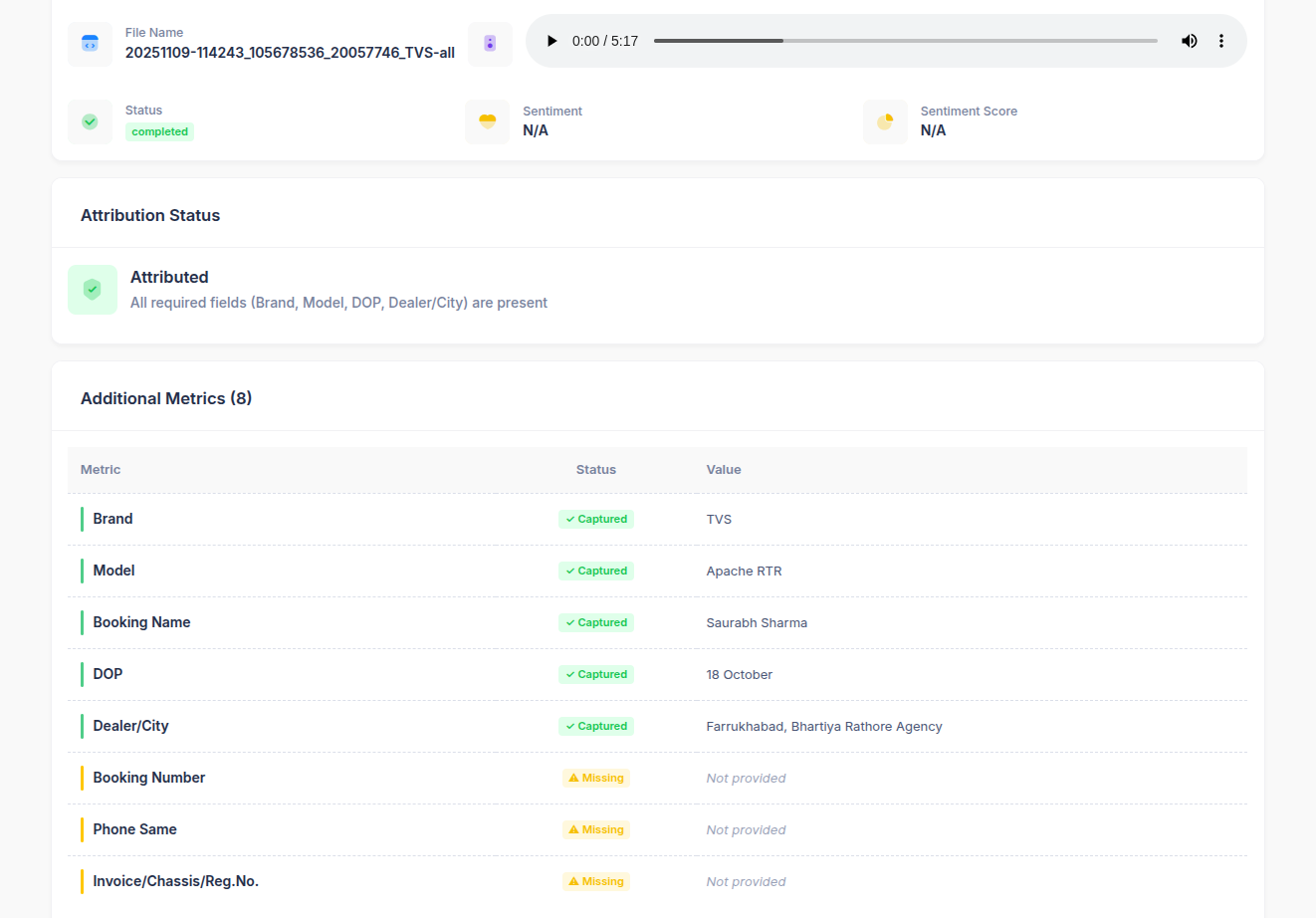 #### Example Output:
| Metric | Status | Value |
| :------------- | :--------- | :----------------------------------- |
| Brand | ✅ Captured | TVS |
| Model | ✅ Captured | Apache RTR |
| Booking Name | ✅ Captured | Saurabh Sharma |
| DOP | ✅ Captured | 18 October |
| Dealer/City | ✅ Captured | Farrukhabad, Bhartiya Rathore Agency |
| Booking Number | ⚠️ Missing | Not Provided |
| Phone Same | ⚠️ Missing | Not Provided |
This helps QA teams quickly see **data completeness** and **compliance health** across calls.
### 4. Attribution Classification
Based on KPI fulfillment, each call is automatically classified as:
* **Attributed** → All required fields (e.g., Brand, Model, DOP, Dealer/City) captured.
* **Non-Attributed** → One or more key fields missing or incomplete.
You can filter calls by **Attribution Status** to review specific subsets:
* *Attributed*
* *Non-Attributed*
### 5. Filtering and Analysis View
In the **Analytics & Jobs** section, QA managers can:
* Search using **Call ID**, **Call URL**, or other filters.
* Apply filters like **Attribution Status** to narrow down relevant calls.
* Play back recordings and review extracted data or KPI results.
#### Example Output:
| Metric | Status | Value |
| :------------- | :--------- | :----------------------------------- |
| Brand | ✅ Captured | TVS |
| Model | ✅ Captured | Apache RTR |
| Booking Name | ✅ Captured | Saurabh Sharma |
| DOP | ✅ Captured | 18 October |
| Dealer/City | ✅ Captured | Farrukhabad, Bhartiya Rathore Agency |
| Booking Number | ⚠️ Missing | Not Provided |
| Phone Same | ⚠️ Missing | Not Provided |
This helps QA teams quickly see **data completeness** and **compliance health** across calls.
### 4. Attribution Classification
Based on KPI fulfillment, each call is automatically classified as:
* **Attributed** → All required fields (e.g., Brand, Model, DOP, Dealer/City) captured.
* **Non-Attributed** → One or more key fields missing or incomplete.
You can filter calls by **Attribution Status** to review specific subsets:
* *Attributed*
* *Non-Attributed*
### 5. Filtering and Analysis View
In the **Analytics & Jobs** section, QA managers can:
* Search using **Call ID**, **Call URL**, or other filters.
* Apply filters like **Attribution Status** to narrow down relevant calls.
* Play back recordings and review extracted data or KPI results.
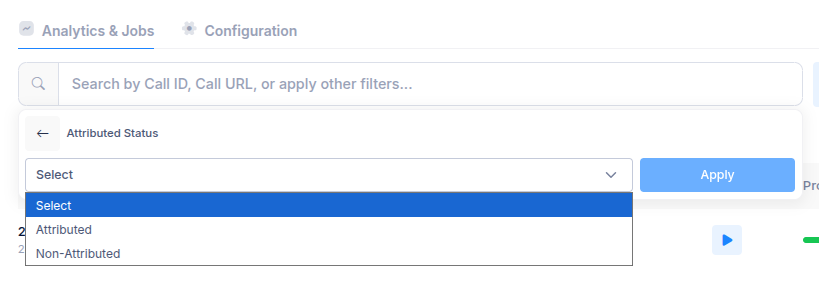 This enables targeted quality evaluation—helping teams focus on improvement areas and compliance adherence.