> ## Documentation Index
> Fetch the complete documentation index at: https://docs.uservox.ai/llms.txt
> Use this file to discover all available pages before exploring further.
# Dashboard
> The Daily Dashboard in UserVox.ai provides a snapshot of calling activity and outcomes on a day-to-day basis. Unlike Cohort Analytics (which is tied to lead insertion date), the Daily Dashboard tracks real-time daily performance, showing how many calls were made, how many leads showed interest, and how many call minutes (pulses) were consumed.
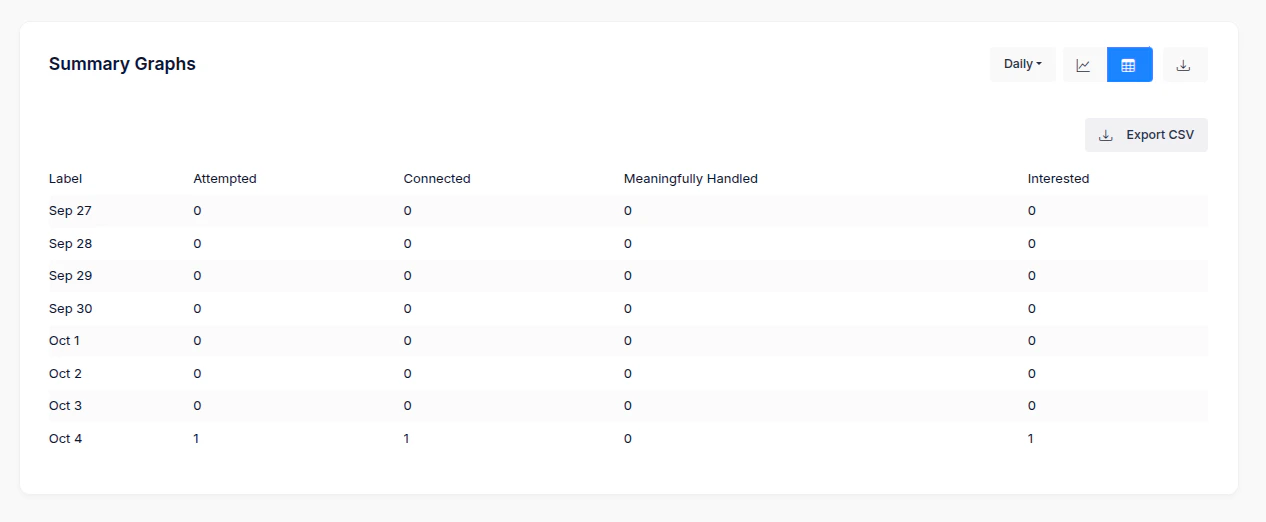
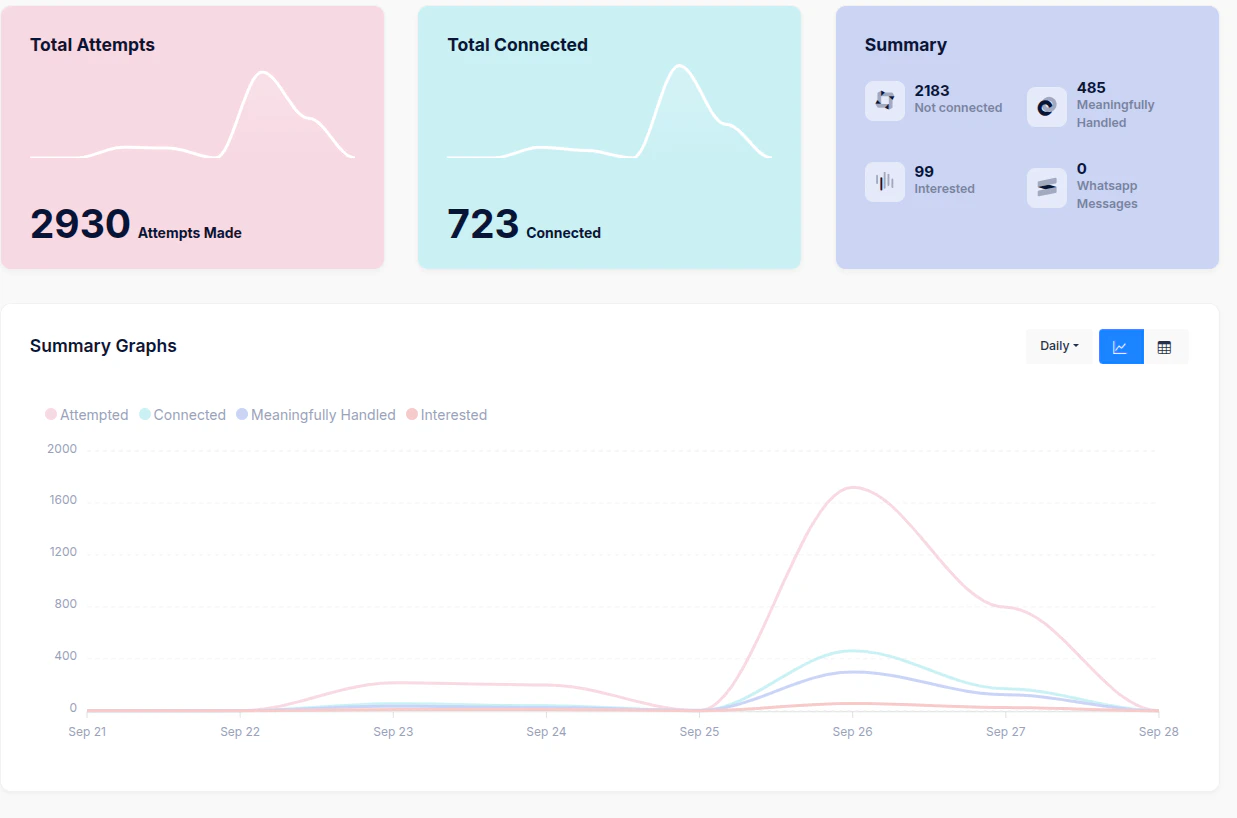 You can download these metrics by clicking the **"Tabular"** icon located above the graph, as shown below:
 ***
## 1. Key Metrics
* **Total Calls (Daily)**\
Number of outbound calls attempted on a given day, across all leads (new or old).
* **Connected Calls**\
Number of calls successfully connected (customer picked up).
* **Interested Calls**\
Subset of connected calls where the lead expressed interest.
* **Lost Calls**\
Calls that resulted in disqualification, wrong number, or explicit non-interest.
* **Not Concluded**\
Calls that are pending follow-up, callback scheduled, or where the customer didn’t provide a clear response.
***
## 2. Conversion Indicators
* **Daily Conversion Rate (Connected → Interested)**\
Percentage of connected calls that converted into interest.\
Formula = Interested Calls ÷ Connected Calls.
* **Daily Interest Rate (Total → Interested)**\
Percentage of all calls attempted that resulted in an interested lead.\
Formula = Interested Calls ÷ Total Calls.
***
## 3. Call Pulses (Usage Metrics)
* **Pulse Definition:**\
Every outbound call is measured in **pulses** for billing and tracking purposes.
* **1 pulse = 1 minute**
* Calls between 0–59 seconds are counted as **1 pulse**.
* Calls of 60–119 seconds are counted as **2 pulses**, and so on.
* **Daily Pulse Count:**\
The dashboard shows the **total number of pulses consumed per day**, giving users visibility into actual call-time utilization.
* **Pulse Efficiency:**\
Average duration per connected call (pulses ÷ connected calls) can be used to benchmark agent efficiency.
***
## 4. Example Daily Flow
**Day: Sep 27, 2025**
* Total Calls: 500
* Connected Calls: 180
* Interested Calls: 30
* Lost Calls: 120
* Not Concluded: 50
* Pulses Consumed: 520
➡️ Interpretation:
* 36% connectivity rate (180 ÷ 500).
* 16.6% of connected leads showed interest (30 ÷ 180).
* Average call length = 520 pulses ÷ 180 connected ≈ 2.9 minutes.
***
## 5. Why the Daily Dashboard Matters
* **Real-Time Monitoring** – Gives daily visibility into lead response trends.
* **Resource Management** – Tracks call volume and minutes spent per day.
* **Performance Benchmarking** – Allows teams to compare one day’s efficiency and conversion to another, regardless of when leads were inserted.
* **Billing Transparency** – Daily pulse data ensures clarity on usage-based costs.
***
## 1. Key Metrics
* **Total Calls (Daily)**\
Number of outbound calls attempted on a given day, across all leads (new or old).
* **Connected Calls**\
Number of calls successfully connected (customer picked up).
* **Interested Calls**\
Subset of connected calls where the lead expressed interest.
* **Lost Calls**\
Calls that resulted in disqualification, wrong number, or explicit non-interest.
* **Not Concluded**\
Calls that are pending follow-up, callback scheduled, or where the customer didn’t provide a clear response.
***
## 2. Conversion Indicators
* **Daily Conversion Rate (Connected → Interested)**\
Percentage of connected calls that converted into interest.\
Formula = Interested Calls ÷ Connected Calls.
* **Daily Interest Rate (Total → Interested)**\
Percentage of all calls attempted that resulted in an interested lead.\
Formula = Interested Calls ÷ Total Calls.
***
## 3. Call Pulses (Usage Metrics)
* **Pulse Definition:**\
Every outbound call is measured in **pulses** for billing and tracking purposes.
* **1 pulse = 1 minute**
* Calls between 0–59 seconds are counted as **1 pulse**.
* Calls of 60–119 seconds are counted as **2 pulses**, and so on.
* **Daily Pulse Count:**\
The dashboard shows the **total number of pulses consumed per day**, giving users visibility into actual call-time utilization.
* **Pulse Efficiency:**\
Average duration per connected call (pulses ÷ connected calls) can be used to benchmark agent efficiency.
***
## 4. Example Daily Flow
**Day: Sep 27, 2025**
* Total Calls: 500
* Connected Calls: 180
* Interested Calls: 30
* Lost Calls: 120
* Not Concluded: 50
* Pulses Consumed: 520
➡️ Interpretation:
* 36% connectivity rate (180 ÷ 500).
* 16.6% of connected leads showed interest (30 ÷ 180).
* Average call length = 520 pulses ÷ 180 connected ≈ 2.9 minutes.
***
## 5. Why the Daily Dashboard Matters
* **Real-Time Monitoring** – Gives daily visibility into lead response trends.
* **Resource Management** – Tracks call volume and minutes spent per day.
* **Performance Benchmarking** – Allows teams to compare one day’s efficiency and conversion to another, regardless of when leads were inserted.
* **Billing Transparency** – Daily pulse data ensures clarity on usage-based costs.